Upgrade your Network Maps

Posted in NetFlow, NetFlow Analyzer, Network Traffic Monitor, Scrutinizer, sFlow on January 20th, 2010 by Jo-G
upgrade-your-network-maps

Thinking outside of the box can produce some innovative ideas.

While the network maps in Scrutinizer can make the traffic flow on your network easier to visualize and congested links quicker to spot, adding more visual definition to your maps will make them more user friendly and understandable by more members of your organization.

So how do you spice up your NetFlow data and breathe some life into your network utilization maps? Try combining a tool created for home design with a network monitoring tool to create incredible network maps.

Read more »

Tags: , , , , , , ,

Network mapping tips for Scrutinizer

Posted in NetFlow, NetFlow Analyzer, Scrutinizer on June 1st, 2009 by Raul J Duran
network-mapping-tips-for-scrutinizer

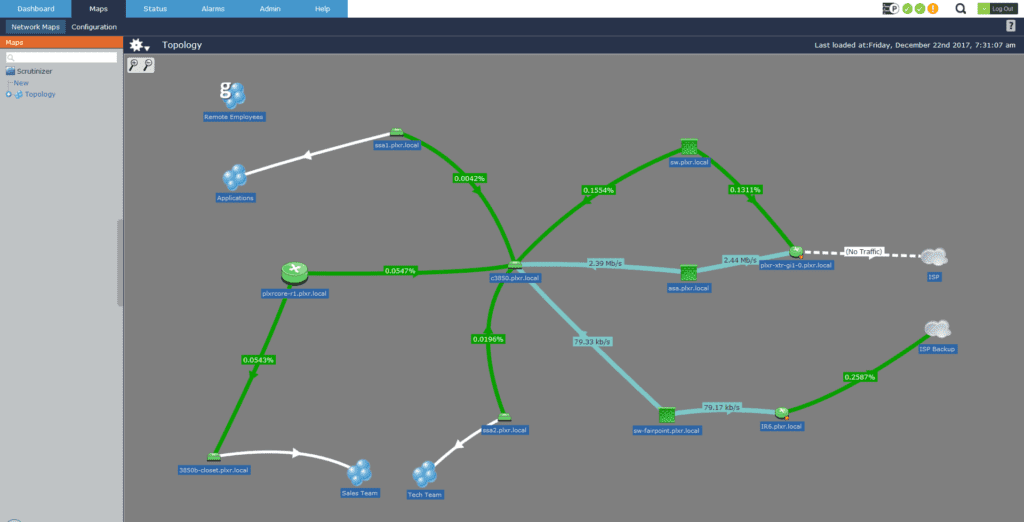
I think one of the best features of Scrutinizer is the versatility of its network mapping. If you really want to put the polish on Scrutinizer, having a good network map is definitely the way to go.  picture11

One thing I like about the maps is that you can gather a ton of utilization information on just one screen. Scrutinizer color codes utilization of traffic for quick analysis.

Scalable Network Maps

Scrutinizer is also very scalable. You can put as many devices in any group as you like. If you feel like you’re running out of space, you can easily increase the size of the map by modifying the map size defaults, or using your own custom background. Scrutinizer will automatically adjust the size of the background to match the size of the image used in the background.

One of the things I like to do for our customers when on-site is to create a custom background with a company logo.

Customizable Company Network Maps

Creating customized company backgrounds can be done relatively easy. Just create an image (preferably with a dark background) with any paint application, and copy in a company logo. Save the image to .jpg format and copy it into the \Scrutinizer\html\images\maps\backgrounds and you’re done.

Network Monitoring Map with Netflow

You can make these custom images as complicated as you like, but I think a simple dark background is the way to go.  Without a doubt, these maps get noticed by important people. Going the extra mile to get this done is always the way to go in my book.

We have also been working hard on improving the Google map integration with Scrutinizer. We’ve added tons of new features, requested by customers with great ideas. Check out Mike’s blog post on the Google Network Maps.

Raul J Duran

Tags: , ,

The essence of a network map using Cisco NetFlow, sFlow and SNMP

Posted in NetFlow, Network Health Report, Scrutinizer, Third Party Integration on March 17th, 2009 by Jon Mills

What makes a network map good? Useful?
Usually when a customer asks me about the Scrutinizer network maps, I start by saying something like, “We are not a netw+ork map company,” and then I answer the question. Why do I say this? After all, most of our customers like the presentation of our network maps and their unique diagramming ability. I think this is primarily because we have good third-party integration and because the connections between devices change color based on utilization. Connections can change color for more than just Cisco NetFlow; they can also change based on nearly any SNMP OID value like IP SLA MOS (i.e. Mean Opinion Score) values. I’ve also seen NBAR and port errors used to change the color of a link based on a threshold.

Today’s networks are more reliable
I think that’s true; most networks today aren’t seeing the outages we witnessed in the mid-90s. I can remember sitting in tech support at Cabletron Systems telling people to reset the IRM or EMME in the MMAC hub to get the network back up. I think back then people generally accepted the fact that the network was kind of finicky. Today, users don’t take outages in stride as much. This has led to boring network maps with icons that seldom leave the color green.

The largest networks in the world
One of the things that we’ve learned from working on some of the largest networks in the world is that administrators want to be able to answer the question, “Why is it so slow?” Scrutinizer maps outline link by link the major paths through the network, and highlight congested areas of the infrastructure better than most tools on the market. So what is missing?

No auto discovery
Scrutinizer maps are manually created. There is no auto discovery to create the links between devices for you. I encourage customers to limit Scrutinizer maps to the backbone. However, I often witness diagrams with connections to every end user switch. I’ve asked why they put in the time and usually hear something like, “It doesn’t take that long, and my manager loves the maps in Scrutinizer.”

Expect more in Scrutinizer v7
Because of positive customer feedback, we will pour more engineering into Scrutinizer maps in future releases. This will include greater third party integration, which I will extrapolate on later.


Jon Mills
Marketing & Public Relations Manager
Follow Me On Twitter
Tags: , , , , , ,

Replacing my DVD player with a new Digital Media Device

Posted in General on February 23rd, 2009 by jimmyd

Stupid Wal-Mart DVD player

That was it… the last straw. I’d had enough!

We purchased a car DVD player at Wal-Mart last year and it died.  My overall goal with the DVD player was to promote happiness in the car. This solution was specifically targeted towards my 3-year-old daughter,  Molly.  Before last week the product performed well. I would rip some recorded shows to DVD and she would watch them. Primitive, but it worked.

In general, I would get three shows per DVD. For Molly and my wife that was good. For me, being a data freak, it was less then acceptable. I mean, in today’s world of cheap storage, why can’t I have more? My wife assured me that there was no way we were going to replace a working player. My dreams were dashed.

My salvation finally came! One day, the DVD player started to heat up and shut down. Being a technology expert, I looked at the device and unequivocally came to the one and only possible conclusion. It was broken. So, I quickly put it on eBay as an ‘AS-IS’ product,  recouped some of the original cost, and started hunting for a new machine.

imagesI decided to go with the Archos 704 with Wi-Fi. It cost about $100 more than I had spent on the original DVD player, but the added features justified the cost. So, I was off to my happy place, which is buying small electronic devices for me to play with.

In the car this little unit can now hold well over 20 DVDs of content,  it can play music and podcasts, and it can show pictures. For Molly, it’s great. She has a variety of shows to watch, she can listen to an audio story book or even settle down with some music.

At home Molly doesn’t have a TV in her room, but we do let her watch a show or two when appropriate. Now she can watch any of the stored shows, and with the Wi-Fi connection, she can watch shows stored on my Windows Home Server or Media Center. That also includes listening to audio books and music.

So I am pleased. The unit works well with our network and its vast media collection. Best of all, my daughter is happy to enjoy her shows when she wants. I guess you can’t ask for more.

____________________________________
Jim Dougherty aka "Jimmy D"
Lead PreSales Support Engineer and
Netflow Evangelist for Plixer International!

Follow me on Twitter
http://twitter.com/jimmydnet
____________________________________
Tags: , , , , , , ,

Scrutinizer v7: Google Maps Improve

Posted in General, Network Health Report, Scrutinizer, Third Party Integration on January 6th, 2009 by mike@plixer.com
scrutinizer-v7-google-maps-improve

I thought some of you might appreciate an update on some of the nifty Google™ mapping features we are working on for Scrutinizer v7.0.   In the next release we have added the features supported in our flash maps:

  • Clickable links bring up the top hosts/applications/conversations etc. specific to the connection
  • The connections change color based on definable thresholds

Google Map Support in Scrutinizer v7.0

Other Google Map features include:

  • multiple Google maps
  • improved GPS placement for icons
  • icons changing color based on the device status across multiple 3rd party applications
  • linking to other map applications (e.g. flash maps with Visio backgrounds, WhatsUp Gold, etc.)

Version 7.0 will include many new features.  Improved Google map support is only a fraction of what we are working on.  I’ll leak more later.

Michael Patterson
Scrutinizer Product Manager
Follow Me on Twitter
Tags: , , ,

Scrutinizer is not just a NetFlow collector

Posted in General, Network Health Report, Network Problem Resolution, Scrutinizer, Third Party Integration on December 31st, 2008 by Jo-G
scrutinizer-is-not-just-a-netflow-collector

mouseDid you know that you could create network maps for each of your locations (physical office or wiring closet) with Scrutinizer?  Did you know that you could plot your locations worldwide using Google maps?  Or integrate other vendor’s applications in Scrutinizer, to view device statistics with the click of a mouse? (click on mouse to test)

Read more »

Tags: , , , ,