
The 19.7 release of Plixer One introduces the Plixer AI Assistant, a new way to interact with your network and security data.
Now in the Plixer One UI, you can ask questions in plain language, like “Show me top talkers for the last 24 hours,” or “Is there any Telnet traffic on my network?” The AI Assistant automatically brings up the appropriate view, prepopulated with the correct parameters according to your question.
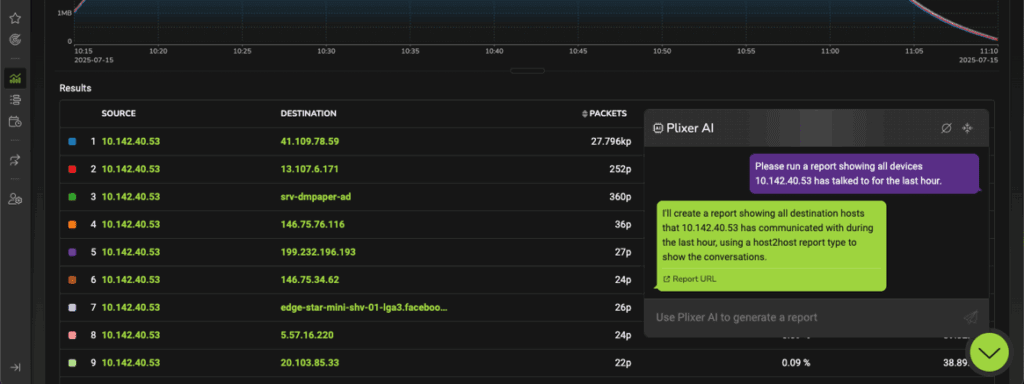
Plixer One delivers detailed network visibility across users, devices, and applications. Solutions designed for that degree of analysis naturally include a wide range of views and settings, making for a deep, complex interface. The AI Assistant helps both new and experienced analysts navigate that depth quickly.
How the AI Assistant Works
The Assistant uses a natural language processing model trained to understand network terminology and operational intent. When you ask a question, the Assistant maps the query to Plixer One’s data model and retrieves the appropriate metrics, filters, and visualizations automatically.
For example, if you ask about traffic on a specific VLAN, the Assistant identifies the relevant exporters, selects the correct time window, and generates a clear timeline view. If you then ask a follow-up question, such as “Which devices caused the most traffic during that period?”, the Assistant refines the same dataset instead of starting over.
This guided interaction builds confidence and consistency across teams. Every investigation follows a structured, explainable path that anyone can review later. And because it’s integrated into Plixer One’s workflow, results appear instantly within the same dashboard environment, eliminating context switching.
Faster Troubleshooting for Every Skill Level
Network and security teams often face uneven workloads and skill gaps. Senior engineers understand where to look and how to interpret data, while newer team members may still be learning the platform. The Plixer AI Assistant helps close that gap by guiding users through each step of the analysis process.
A junior analyst can start by asking a simple question (e.g. “What caused the traffic spike on this link?”) and immediately receive a timeline view showing which hosts were involved, what applications were running, and whether the pattern matches previous behavior. The Assistant also provides follow-up suggestions, such as expanding the time range or focusing on a specific subnet.
This approach not only saves time but also reduces dependency on a highly specialized skillset. The result is fewer escalations, faster resolution, and more consistent incident documentation.
Use Plixer’s LLM or Your Own
The AI Assistant gives you the flexibility to choose how your requests are processed. You can use Plixer’s built-in large language model (LLM) or connect a custom, third-party LLM hosted in your own environment.
This flexibility lets you align the Assistant with your organization’s security and compliance policies. When a user submits a question, only the text of that question is processed by the selected model to determine which Plixer One view or report to open. Network telemetry and stored data never leave the platform.
This approach allows every deployment to benefit from conversational navigation while maintaining full ownership of network data and choice over the underlying AI technology.
Other Enhancements in Version 19.7
The AI Assistant was one of several updates in the 19.7 release designed to make Plixer One easier and faster to use. Alongside it, the release introduced Flow Hopper and an enhanced Topology View, which give users clear visualizations of how traffic moves across the network.
The update also refined alert tuning and analytics configuration, reducing noise from low-priority events, and expanded ML Engine deployment options to simplify setup across hybrid environments.
To find out more about all the new features introduced in Plixer One 19.7, watch the launch webinar replay.