The topic of using Deep Packet Inspection to identify applications and exporting the details using defined Application IDs in NetFlow exports is a growing concern. The current direction of vendors is preventing interoperability and in some cases, the poor template designs and element selections are causing:
• Slow query times
• Excessive disk space consumption
The NetFlow Application ID draft by Claise, Aitken and Dvora tries to address this issue however, it is only meant to create discussion. We feel it is now time to address this issue.
First, lets digress a bit on how we have seen a few vendors tie flows to actual applications that are detected with Deep Packet Inspection (DPI) for example. There is no perfect way to export these details in flow records however, there are a few less than ideal configurations already being used by some vendors.
Less Optimal Approach to Application Aware NetFlow Exports
Two companies, one of which produced the nProbe did exactly what might make the most sense on the surface. They simply stick the application Name (appld) into the flows that are exported. It’s a straight forward export and the query to build the report is fast. This part we like.
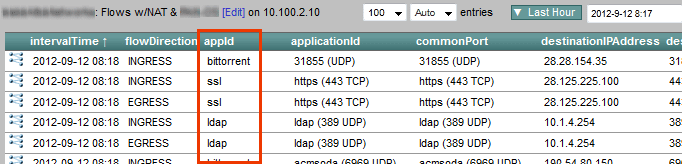
The issue with the the above method is that it is inefficient in some ways because it increases the amount of data going over the wire to carry the NetFlow exports. Exporting 32 bytes for appId consumes more space in the database. By contrast, Cisco exports 4 bytes for applicationTag. The 28 byte difference between these two strategies doesn’t sound like a big deal, but, it’s 28 bytes added to every flow record – stuffed into a NetFlow or IPFIX datagram that is traversing the network. It’s also 28 bytes of additional storage required for every flow saved. Although our Scrutinizer appliance can collect and store over 140,000 flows per second, this 28 bytes per flow could add up to 3.9 MB per second.
Another concern: exporting non-Cisco elements with NetFlow isn’t a good idea because Cisco owns all NetFlow elements. The above companies should use IPFIX. Cisco may use elements carved out by other companies in the future and collector vendors will likely go with the Cisco values and not another company’s. At the very least, if a vendor feels they have to use NetFlow in lieu of IPFIX, they had better copy Cisco exactly! Remember, Cisco owns NetFlow and all of its information element space. Vendors should be using IPFIX. The nProbe has since included an architecture closer to Cisco’s, read on to learn more.
NOTE: Cisco was kind enough to give out blocks of NetFlow elements to several vendors however, this practice is probably not sustainable.
SonicWALL-Dell
SonicWALL uses a method with IPFIX that is a bit closer to what Cisco is doing with NetFlow. They export an Application ID in the flows template which maps to an application name in an option template. Below is the flows template. Notice the flow_to_application_id column.

The ID above is used to link flows exported with this ID to the application name shown below in the application option template. Notice the app_sig_id column below, it holds the same values as the flow_to_application_id found in the flows template above. We feel the same element ID should be used in both places but, it really isn’t much of a problem either (i.e. no big deal).
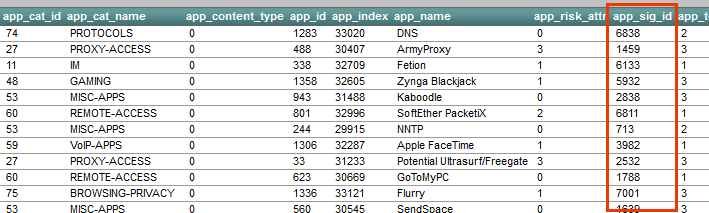
Above you will see that SonicWALL exports app_cat_name or category. This is a very smart element to include. Customers want to know what types of applications they have on their network. Categories can wrap sites like facebook, twitter and linkedin into a single type of traffic.
By linking the two templates above with a query, we can build a report:
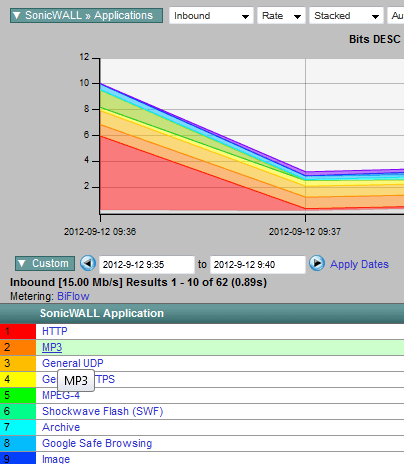
The above strategy is a decent approach to linking flows to actual applications however, having two different elements for application ID may not have been necessary. In the template containing flow data there is an element called: flow_to_application_id. In the option template containing the application name, the same information uses a 2nd element called: app_id. Since these two columns contain the same data, they could have possibly used the same element but again, it was easy to deal with and the architecture is still a good design.
There are also some things SonicWALL did that we really like:
- They included application and category.
- They included a numerical identifier for both application and category. That allows the reporting engine to group more efficiently.
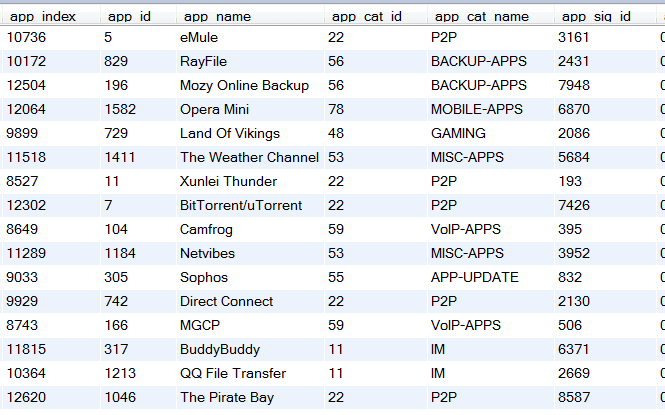
- Their DPI engine is very thorough as the small sample below indicates.
For the most part, SonicWALL is going down the right path but, we still need a standard that all vendors adhere to.
Cisco Systems
It’s no surprise that Cisco Systems is pretty much following the draft mentioned at the beginning of this post which arguably is the best method we have seen so far.
<<< begin paste from draft >>>
This document specifies the applicationId Information Element, which is a single field composed of two parts:
- 8 bits of Classification Engine ID. The Classification Engine can be considered as a specific registry for application assignments.
- m bits of Selector ID. The Selector ID length varies depending on the Classification Engine ID.
      0                   1                   2                   3
      0 1 2 3 4 5 6 7 8 9 0 1 2 3 4 5 6 7 8 9 0 1 2 3 4 5 6 7 8 9 0 1
     +-+-+-+-+-+-+-+-+-+-+-+-+-+-+-+-+-+-+-+-+-+-+-+-+-+-+-+-+-+-+-+-+
     | Class. Eng. ID|         Selector ID  ...                      |
     +-+-+-+-+-+-+-+-+-+-+-+-+-+-+-+-+-+-+-+-+-+-+-+-+-+-+-+-+-+-+-+-+
     |                             ...                               |
     +-+-+-+-+-+-+-+-+-+-+-+-+-+-+-+-+-+-+-+-+-+-+-+-+-+-+-+-+-+-+-+-+
<<< end paste >>>
Below is the Cisco NBAR2 flows template. Notice the applicationTag column.
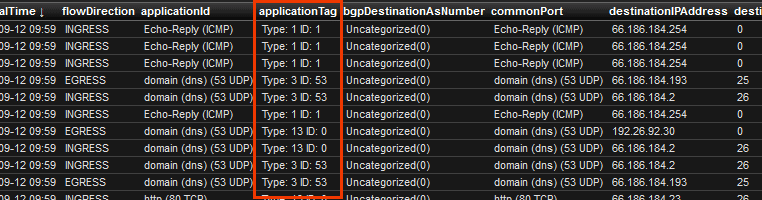
The above 4 byte applicationTag ID (element 95) is used to link flows exported with this ID to the application name displayed below in the Application name options template. Notice the applicationTag column below, it is the same number as the applicationTag found in the flows template above.
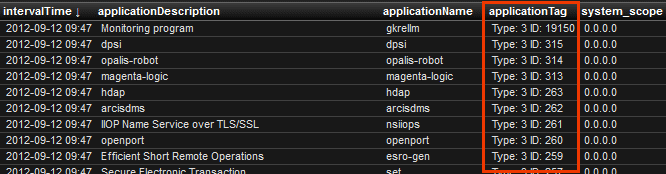
By linking the two templates above with a query, we can build a report:
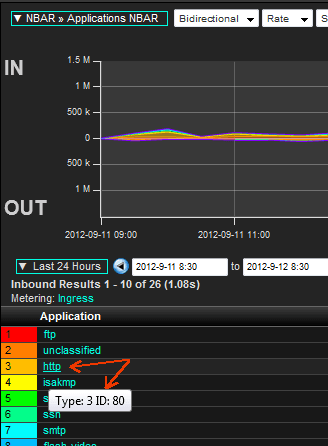
The above strategy is the best approach we have seen for exporting application aware NetFlow/IPFIX exports. Notice above the ‘Type:3’ which is defined in the NetFlow Application ID draft below:
<<< begin paste from draft >>>
           IANA-L4         3      The IANA layer 4 (L4) well-known
                                    port number is exported in the
                                    Selector ID. See [IANA-PORTS].
                                    Note: as an IPFIX flow is
                                    unidirectional, it contains the
                                    destination port in a flow from
                                    the client to the server.
<<< end paste >>>
The Cisco implementation is pretty good. If the engine ID 3 is used, it means that the application can be uniquely identified by the IANA port. So if Cisco reports engine ID 3 and selector ID 80, it means that the application is HTTP. It doesn’t imply that Cisco has ONLY looked at port 80 to identify HTTP. In the above specific HTTP case, NBAR identifies HTTP by doing DPI, and reports: engine ID 3 and selector ID 80.
Cisco has created an application registry of their application names and IDs and the associated application categories but it could use some further defining. It is our recommendation that all vendors follow the above drafts. Exinda Networks did and the Cisco NBAR reports we built work just fine against the Exinda export. If a 3rd party vendor is using Cisco’s application IDs, they should specify engine ID 13.
Nov 11th 2012 update: This topic is now referenced in RFC 6759.
It is Plixer’s position that if a vendor wants to use a proprietary method to identify an application, the engine ID would be 20 and the following bytes would include the vendor PEN and the vendors application ID. Some IPFIX gurus have taken the position that Engine ID 20 is what vendors should be using unless they are going to use Cisco’s identifiers exactly.
We realize that Benoit’s RFC proposes engine ID 20 “to identify that the application registry being used is not owned by the Exporter manufacturer“. However, since it includes a PEN, we don’t see why it should not be used to differentiate any vendors application identifiers (even if the application registry was created by the exporter manufacturer). Perhaps another engine ID will be defined to serve this purpose or the definition of engine ID 20 may someday be relaxed to allow for our proposed use.
Summary
Even with the above changes, IPFIX exporting vendors need to understand that how they construct the templates they are exporting will greatly impact the performance of reporting engines. While details will vary depending on the database used by any one solution, there are some universal truths that apply:
- Aggregating data based on an ID will be faster than aggregating data based on a string. Whatever the database or field sizes, the ID will end up being fewer bytes than a typical string.
- Templates that contain flow data and templates that contain descriptions should be related by identifiers. The same element ID should be used in both templates.
- If the flow data contains all fields that are reported on and the option templates are only used for descriptions, the reporting will be faster. For example, the Cisco ASR is capable of exporting at least two templates:
a. A meta data template containing: application ID, application name, category ID and category name
b. A flow template containing typical flow details plus an application ID.
For reasons stated in this post, we feel that vendors need to finish drafting a proposed application aware IPFIX standard. Hopefully we can agree on a standard mechanism. What makes the most sense to us is to continue on with the draft Cisco has published with a few modifications. I understand that it is unlikely that we’ll ever be able to define a single application registry. This goal faces a few obstacles. For example, how would we know that vendor A’s app #X was the same as vendor B’s app Y? What if they were overlapping but non-equal definitions? Hardware vendors should also keep in mind that as soon as we publish our definitions, hackers simply modify their traffic a little to try and defeat detection. Again, these issues should not keep us from trying.